> ## Documentation Index
> Fetch the complete documentation index at: https://alphacastio.mintlify.site/llms.txt
> Use this file to discover all available pages before exploring further.
# Append Dataset
> Stack datasets with the same structure on top of each other, with control over duplicate handling.
The **Append Dataset** step combines datasets with the same structure one on top of the other. Use it when the same data lives in separate datasets — different months or years, for example — and you need it as one series.
Select the datasets to append and the variables to include, then choose how duplicates should be handled.
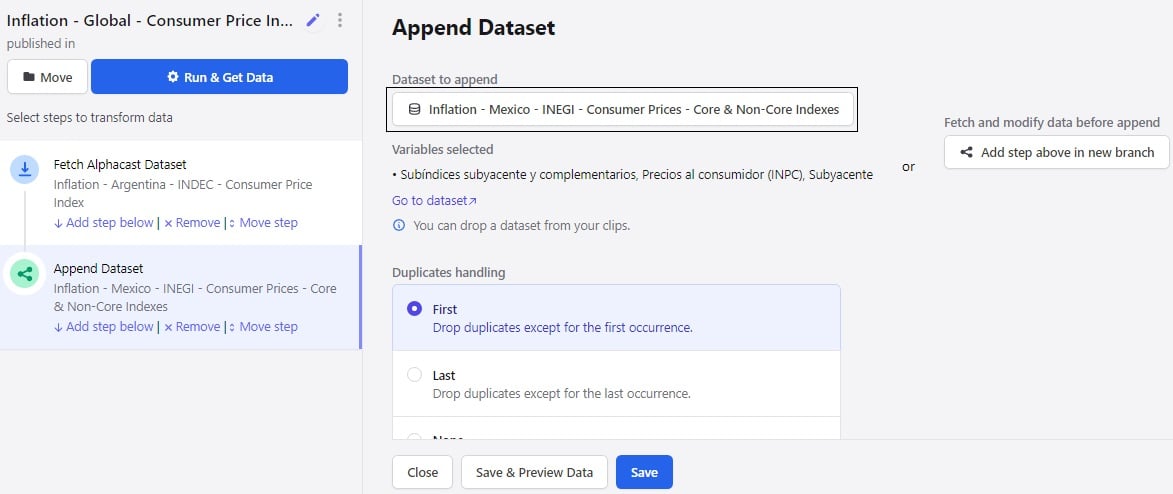 Check that the datasets really do share the same structure before appending. Mismatched column names produce sparse columns rather than an error.
## Fetching and modifying before appending
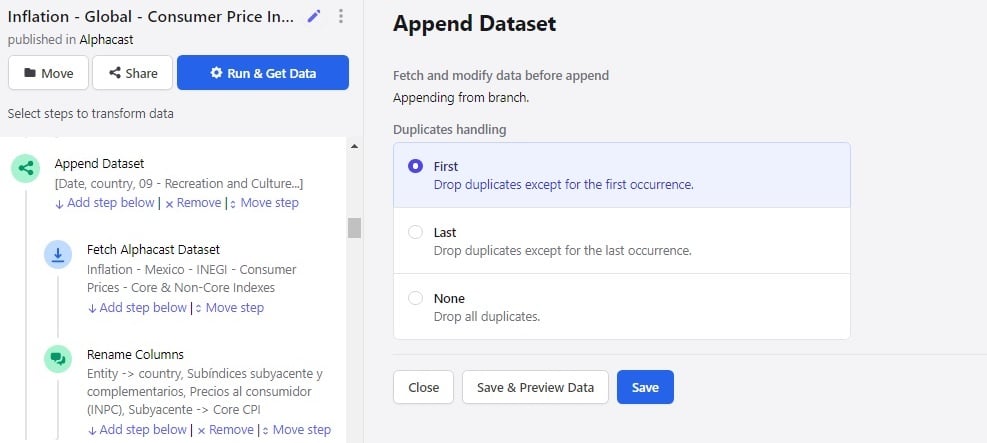
You can also transform data before it is appended:
In the **Fetch** step, select the dataset you want to take data from, and apply any steps you need.
In the **Append Dataset** step, choose how duplicate records are dropped: keep the first occurrence, keep the last occurrence, or drop all duplicates.
Check that the datasets really do share the same structure before appending. Mismatched column names produce sparse columns rather than an error.
## Fetching and modifying before appending
You can also transform data before it is appended:
In the **Fetch** step, select the dataset you want to take data from, and apply any steps you need.
In the **Append Dataset** step, choose how duplicate records are dropped: keep the first occurrence, keep the last occurrence, or drop all duplicates.
 Appending stacks rows vertically. To join datasets side by side on shared entities, use [Merge branches](/steps/merge).
## Next steps
Join datasets on common entities instead.
Restore chronological order after appending.
Appending stacks rows vertically. To join datasets side by side on shared entities, use [Merge branches](/steps/merge).
## Next steps
Join datasets on common entities instead.
Restore chronological order after appending.