> ## Documentation Index
> Fetch the complete documentation index at: https://alphacastio.mintlify.site/llms.txt
> Use this file to discover all available pages before exploring further.
# Apply Country Transform
> Country-specific unit conversions — constant prices, per capita, % of GDP and currency conversion — with explicit control over which country applies.
The **Apply Country Transform** step performs the unit conversions that depend on a country's reference data: inflation indices for constant prices, population for per capita, GDP series for shares of GDP, and exchange rates for currency conversion.
It is the same engine as [Apply Transform](/steps/transform), narrowed to country-dependent conversions and with explicit control over **which country** the reference data comes from.
## Configuration
The step detects the input frequency and offers only the conversions valid for it.
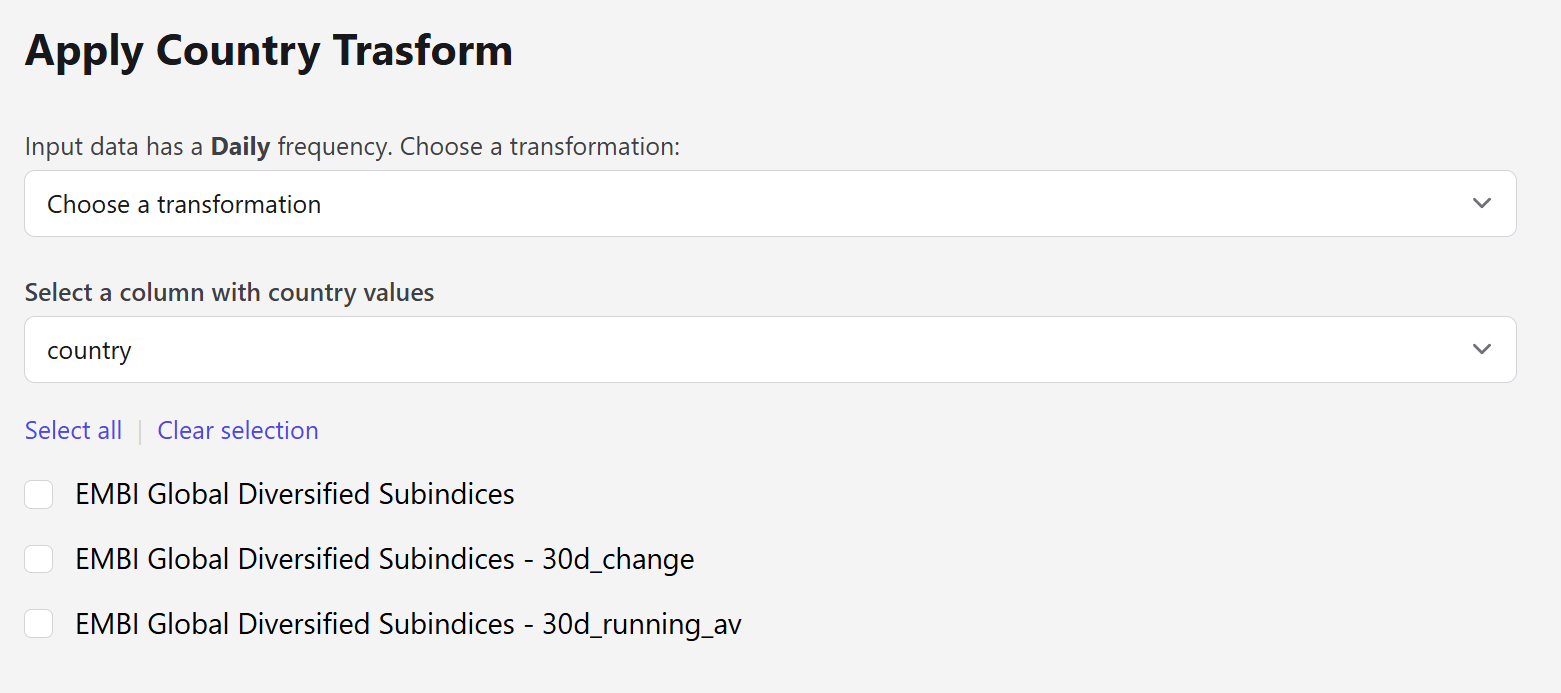 | Field | Description |
| -------------- | ----------------------------------------------------------------------------------------------------- |
| Transformation | Which conversion to apply. The options depend on the detected frequency. |
| Country column | The column holding country values. Defaults to a column named `country` or `Country` when one exists. |
| Country | A fixed country, used instead of a column when the dataset has no country entity. |
| Columns | The columns to convert. Use **Select all** / **Clear selection** for bulk changes. |
This is the step's distinguishing feature. [Apply Transform](/steps/transform) requires the dataset to carry a country entity; here you can point at any column, or declare a single country outright — which is what makes these conversions possible on datasets that never named a country in the first place.
## Available conversions
| Transformation |
| ---------------------------------------------- |
| Currency conversion LCU / USD - daily |
| Currency conversion BCS / USD (Argentina only) |
| Transformation |
| ---------------------------------------------- |
| Constant prices |
| Per Capita |
| % of GDP |
| % of USD GDP |
| Sum last 12 months - % of GDP |
| Currency conversion LCU / USD - monthly |
| Currency conversion BCS / USD (Argentina only) |
| Transformation |
| ---------------------------------------------- |
| Constant prices |
| Per Capita |
| % of GDP |
| Currency conversion LCU / USD - quarterly |
| Currency conversion BCS / USD (Argentina only) |
| Transformation |
| ---------------------------------------------- |
| Constant prices |
| Per Capita |
| % of GDP |
| % of Current USD GDP |
| Currency conversion LCU / USD |
| Currency conversion BCS / USD (Argentina only) |
Each conversion pulls its reference series from Alphacast automatically — the step shows which auxiliary datasets it is using once you pick a transformation.
## Next steps
The full transformation set, including changes and moving averages.
Harmonize country names so the reference data matches.
| Field | Description |
| -------------- | ----------------------------------------------------------------------------------------------------- |
| Transformation | Which conversion to apply. The options depend on the detected frequency. |
| Country column | The column holding country values. Defaults to a column named `country` or `Country` when one exists. |
| Country | A fixed country, used instead of a column when the dataset has no country entity. |
| Columns | The columns to convert. Use **Select all** / **Clear selection** for bulk changes. |
This is the step's distinguishing feature. [Apply Transform](/steps/transform) requires the dataset to carry a country entity; here you can point at any column, or declare a single country outright — which is what makes these conversions possible on datasets that never named a country in the first place.
## Available conversions
| Transformation |
| ---------------------------------------------- |
| Currency conversion LCU / USD - daily |
| Currency conversion BCS / USD (Argentina only) |
| Transformation |
| ---------------------------------------------- |
| Constant prices |
| Per Capita |
| % of GDP |
| % of USD GDP |
| Sum last 12 months - % of GDP |
| Currency conversion LCU / USD - monthly |
| Currency conversion BCS / USD (Argentina only) |
| Transformation |
| ---------------------------------------------- |
| Constant prices |
| Per Capita |
| % of GDP |
| Currency conversion LCU / USD - quarterly |
| Currency conversion BCS / USD (Argentina only) |
| Transformation |
| ---------------------------------------------- |
| Constant prices |
| Per Capita |
| % of GDP |
| % of Current USD GDP |
| Currency conversion LCU / USD |
| Currency conversion BCS / USD (Argentina only) |
Each conversion pulls its reference series from Alphacast automatically — the step shows which auxiliary datasets it is using once you pick a transformation.
## Next steps
The full transformation set, including changes and moving averages.
Harmonize country names so the reference data matches.