> ## Documentation Index
> Fetch the complete documentation index at: https://alphacastio.mintlify.site/llms.txt
> Use this file to discover all available pages before exploring further.
# Validate Countries
> Check country names against a canonical list and decide what happens to the ones that don't match — fail, remove, fuzzy match or rename.
The **Validate Countries** step checks the values of a country column against a canonical country list and normalizes them to a standard name. It is what makes country-dependent transformations reliable: [Apply Transform](/steps/transform) and [Apply Country Transform](/steps/change-units) can only find the right inflation, population or GDP reference series if the country names match.
## Configuration
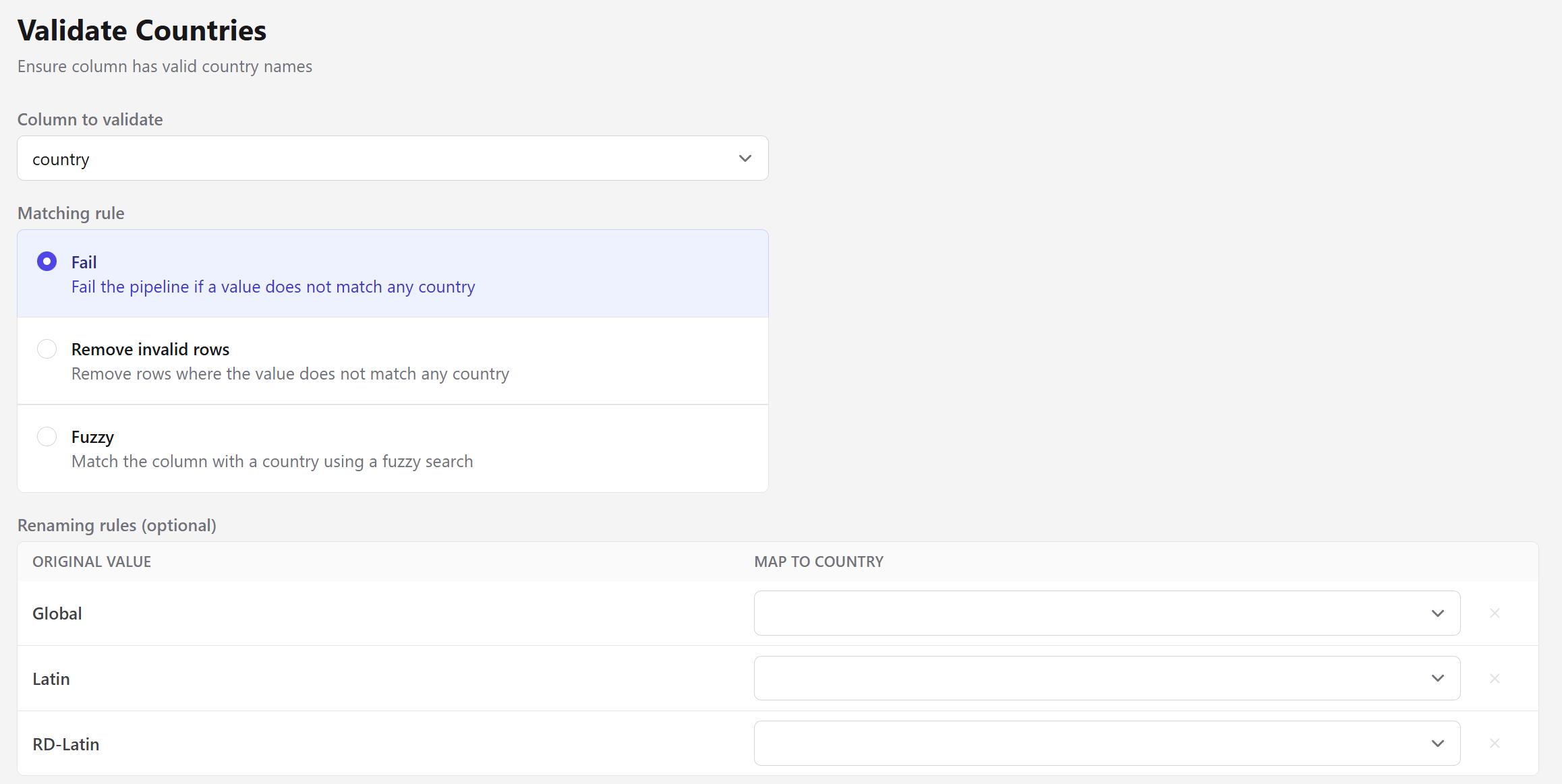 | Field | Description |
| ------------------ | --------------------------------------------------------------------------------------------------------------- |
| Column to validate | The entity column holding country names. |
| Matching rule | What to do with values that don't match. See below. |
| Renaming rules | Optional explicit mappings from an original value to a country. Always honored, whichever matching rule is set. |
## Matching rules
| Rule | Behavior |
| ----------------------- | -------------------------------------------------------------------------------------- |
| **Fail** | Fails the pipeline if a value does not match any country. The default, and the safest. |
| **Remove invalid rows** | Removes rows where the value does not match any country. |
| **Fuzzy** | Matches the value to a country using a fuzzy search. |
The renaming table is prefilled with the values the step could not identify — `Global`, `Latin` and `RD-Latin` in the screenshot above — so you can map the ones that are real countries and decide what to do with the rest.
Fuzzy matching always picks *some* country — it takes the highest-scoring candidate with no minimum threshold. That makes it convenient for near-misses like `Argentina ` or `Brasil`, and risky for values that aren't countries at all. Prefer explicit renaming rules when you know what the odd values are.
Matching is accent- and case-insensitive, so `méxico`, `Mexico` and `MEXICO` all resolve to the same canonical name.
Aggregate labels like `Global`, `Latin` or a regional grouping are not countries and never will be. Leave them unmapped and use **Remove invalid rows**, or split them out with [Filter Entity](/steps/filter-entity) before validating.
The step also fails when two different input values resolve to the **same** country, since that would silently merge rows. It names both values so you can decide which is correct.
## Next steps
Conversions that depend on matching the right country.
Harmonize non-country values by hand.
| Field | Description |
| ------------------ | --------------------------------------------------------------------------------------------------------------- |
| Column to validate | The entity column holding country names. |
| Matching rule | What to do with values that don't match. See below. |
| Renaming rules | Optional explicit mappings from an original value to a country. Always honored, whichever matching rule is set. |
## Matching rules
| Rule | Behavior |
| ----------------------- | -------------------------------------------------------------------------------------- |
| **Fail** | Fails the pipeline if a value does not match any country. The default, and the safest. |
| **Remove invalid rows** | Removes rows where the value does not match any country. |
| **Fuzzy** | Matches the value to a country using a fuzzy search. |
The renaming table is prefilled with the values the step could not identify — `Global`, `Latin` and `RD-Latin` in the screenshot above — so you can map the ones that are real countries and decide what to do with the rest.
Fuzzy matching always picks *some* country — it takes the highest-scoring candidate with no minimum threshold. That makes it convenient for near-misses like `Argentina ` or `Brasil`, and risky for values that aren't countries at all. Prefer explicit renaming rules when you know what the odd values are.
Matching is accent- and case-insensitive, so `méxico`, `Mexico` and `MEXICO` all resolve to the same canonical name.
Aggregate labels like `Global`, `Latin` or a regional grouping are not countries and never will be. Leave them unmapped and use **Remove invalid rows**, or split them out with [Filter Entity](/steps/filter-entity) before validating.
The step also fails when two different input values resolve to the **same** country, since that would silently merge rows. It names both values so you can decide which is correct.
## Next steps
Conversions that depend on matching the right country.
Harmonize non-country values by hand.