> ## Documentation Index
> Fetch the complete documentation index at: https://alphacastio.mintlify.site/llms.txt
> Use this file to discover all available pages before exploring further.
# Filter Dates
> Restrict a pipeline to a fixed date range or to a window defined relative to today.
The **Filter Dates** step narrows the pipeline to the time period you want to focus on. It supports two modes.
## Absolute date range
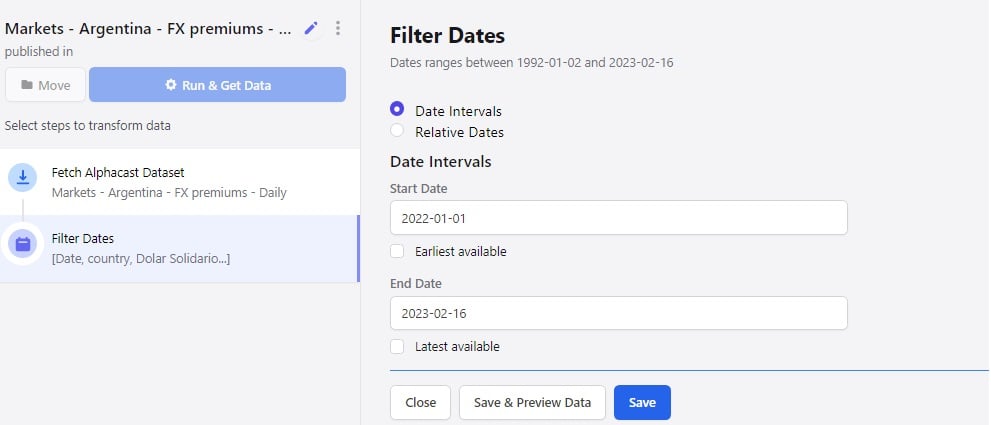
Specify a start and end date by clicking the calendar.
You can also click **earliest available** to pull the full history, and **latest available** to always track the most recent data point without editing the step again.
 ## Relative dates
Click **relative dates** to filter against a window measured from the current date. Choose a number of years, quarters, months or days.
## Relative dates
Click **relative dates** to filter against a window measured from the current date. Choose a number of years, quarters, months or days.
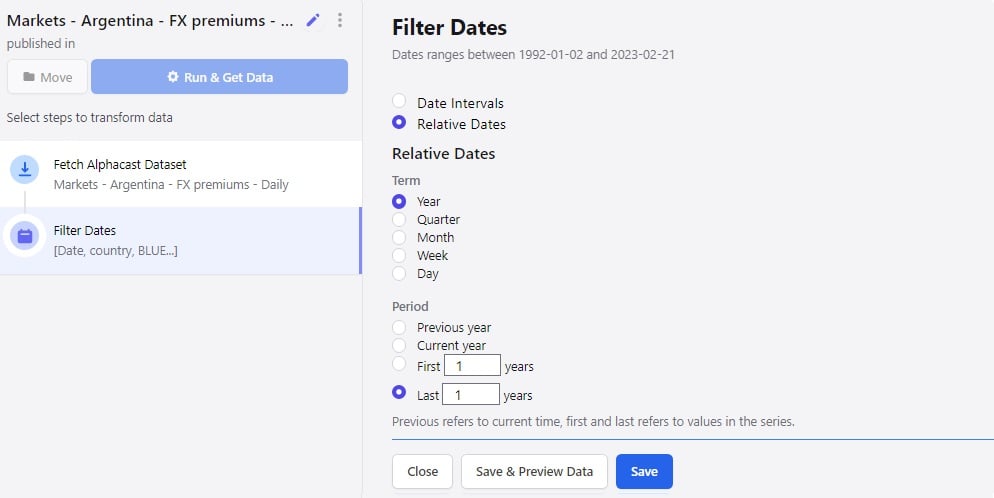 Relative dates keep a scheduled pipeline pointed at a rolling window — for example the last 24 months — without any maintenance.
Remember to save the step before moving to the next one.
## Next steps
Resample the series to a different time frequency.
Filter by value rather than by date.
Relative dates keep a scheduled pipeline pointed at a rolling window — for example the last 24 months — without any maintenance.
Remember to save the step before moving to the next one.
## Next steps
Resample the series to a different time frequency.
Filter by value rather than by date.