> ## Documentation Index
> Fetch the complete documentation index at: https://alphacastio.mintlify.site/llms.txt
> Use this file to discover all available pages before exploring further.
# Regroup Entities
> Drop an entity column and aggregate the remaining rows with a formula — the equivalent of GROUP BY.
The **Regroup Entities** step removes an entity and regroups the data by the ones that remain, using a formula you choose to aggregate. It is the equivalent of **GROUP BY** in SQL or `groupby` in pandas.
## Why entities need care
Entity columns are the columns required to **uniquely** identify a row. Because of that, a combination of entity values can never repeat — which makes removing or changing entities a delicate operation that can corrupt the data if done carelessly.
Say you have a dataset with Date and Country as entities, the most common combination in Alphacast. You will have many rows for the same date, one per country. **You cannot simply drop the Country column**, because dates would then repeat and entity combinations must be unique.
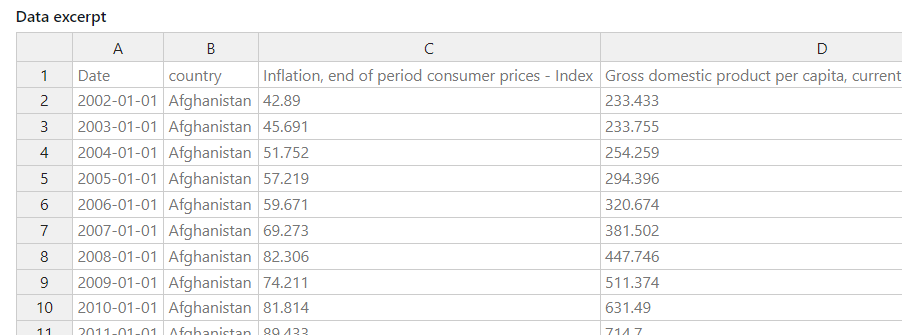 Regrouping is how you resolve this.
## How to regroup
Start from a [Fetch Dataset](/steps/fetch-dataset) step.
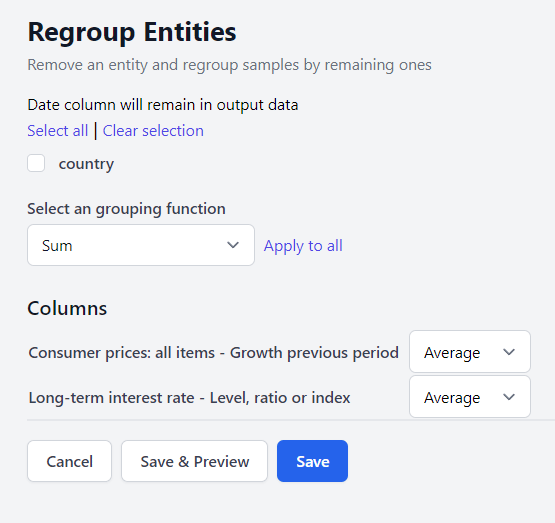
Deselect the entities you want to remove.
Decide how rows that now share the same entity values should be combined — the Date, in the example above.
The aggregation is set **per column**, so different columns can be combined differently in the same step. The right choice depends entirely on what each column represents.
| Aggregation | What it does |
| ---------------- | ----------------------------------------------- |
| `sum` | Total of the group's values. |
| `mean` / `avg` | Arithmetic mean, ignoring nulls. |
| `median` | Median, ignoring nulls. |
| `min` / `max` | Smallest or largest value in the group. |
| `count` | Number of non-zero values. |
| `product` | Product of the group's values. |
| `std` / `var` | Standard deviation or variance, ignoring nulls. |
| `first` / `last` | First or last value in the group. |
| `meanw` | Weighted mean. Requires a weight column. |
| `sumw` | Weighted sum. Requires a weight column. |
| `drop` | Discards the column instead of aggregating it. |
Weighted aggregations are the right choice when combining rates or ratios across entities — a weighted mean of inflation across countries needs a population or GDP weight column, since a plain mean would treat every country equally.
The result keeps every entity except the ones you excluded, and has fewer rows than the original because rows sharing entity values are collapsed together.
Regrouping is how you resolve this.
## How to regroup
Start from a [Fetch Dataset](/steps/fetch-dataset) step.
Deselect the entities you want to remove.
Decide how rows that now share the same entity values should be combined — the Date, in the example above.
The aggregation is set **per column**, so different columns can be combined differently in the same step. The right choice depends entirely on what each column represents.
| Aggregation | What it does |
| ---------------- | ----------------------------------------------- |
| `sum` | Total of the group's values. |
| `mean` / `avg` | Arithmetic mean, ignoring nulls. |
| `median` | Median, ignoring nulls. |
| `min` / `max` | Smallest or largest value in the group. |
| `count` | Number of non-zero values. |
| `product` | Product of the group's values. |
| `std` / `var` | Standard deviation or variance, ignoring nulls. |
| `first` / `last` | First or last value in the group. |
| `meanw` | Weighted mean. Requires a weight column. |
| `sumw` | Weighted sum. Requires a weight column. |
| `drop` | Discards the column instead of aggregating it. |
Weighted aggregations are the right choice when combining rates or ratios across entities — a weighted mean of inflation across countries needs a population or GDP weight column, since a plain mean would treat every country equally.
The result keeps every entity except the ones you excluded, and has fewer rows than the original because rows sharing entity values are collapsed together.
 This step uses the fixed list of aggregations above, not the formula editor. To compute a value that isn't in the list, add a [Calculate Variable](/steps/calculate-variable) step before or after regrouping.
## Next steps
Compute values the fixed aggregations don't cover.
Aggregate along the time dimension instead.
This step uses the fixed list of aggregations above, not the formula editor. To compute a value that isn't in the list, add a [Calculate Variable](/steps/calculate-variable) step before or after regrouping.
## Next steps
Compute values the fixed aggregations don't cover.
Aggregate along the time dimension instead.