> ## Documentation Index
> Fetch the complete documentation index at: https://alphacastio.mintlify.site/llms.txt
> Use this file to discover all available pages before exploring further.
# Reorder Columns
> Set the order in which columns appear in the pipeline output.
The **Reorder Columns** step changes the order columns appear in. Useful when your analysis — or the dataset you publish — needs a specific layout.
Click **Up** or **Down** to move a column:
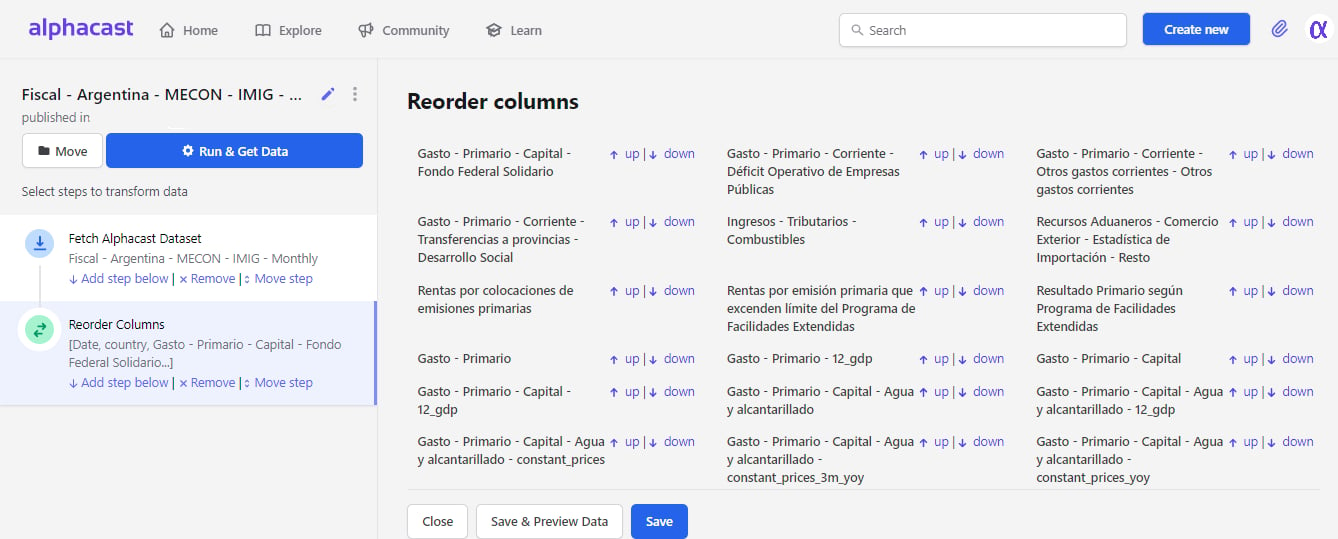 Reordering is presentational: no values change and no rows are affected.
## Next steps
Change column names as well as their order.
Save the result with the layout you set.
Reordering is presentational: no values change and no rows are affected.
## Next steps
Change column names as well as their order.
Save the result with the layout you set.