> ## Documentation Index
> Fetch the complete documentation index at: https://alphacastio.mintlify.site/llms.txt
> Use this file to discover all available pages before exploring further.
# Select Columns
> Keep only the columns you need, reducing the data processed by every downstream step.
The **Select Columns** step filters columns down to the ones you care about, cutting the volume of data processed by the steps that follow. The variable selector shows the data as it stands at that point in the pipeline.
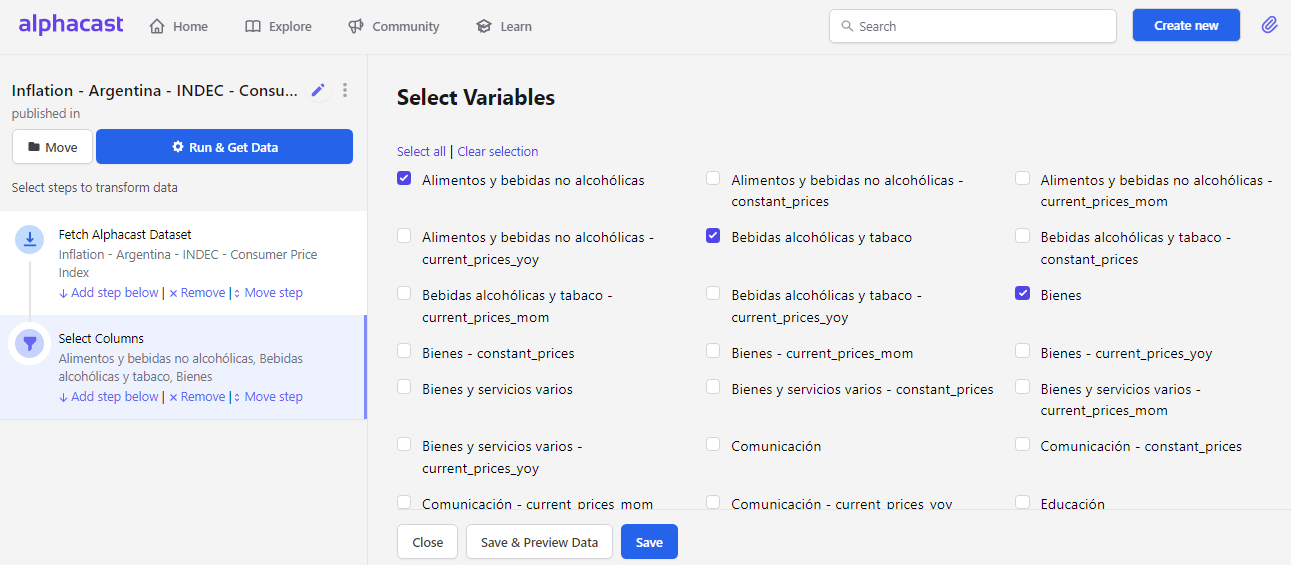 Entity columns — the date and dimension columns that uniquely identify a row — are always retained.
Remember to save the step before moving to the next one.
## Next steps
Give the surviving columns clearer names.
Set the order columns appear in.
Entity columns — the date and dimension columns that uniquely identify a row — are always retained.
Remember to save the step before moving to the next one.
## Next steps
Give the surviving columns clearer names.
Set the order columns appear in.