This page covers how the step works. For the complete list of operators and functions, see the formula reference.
Writing a basic formula
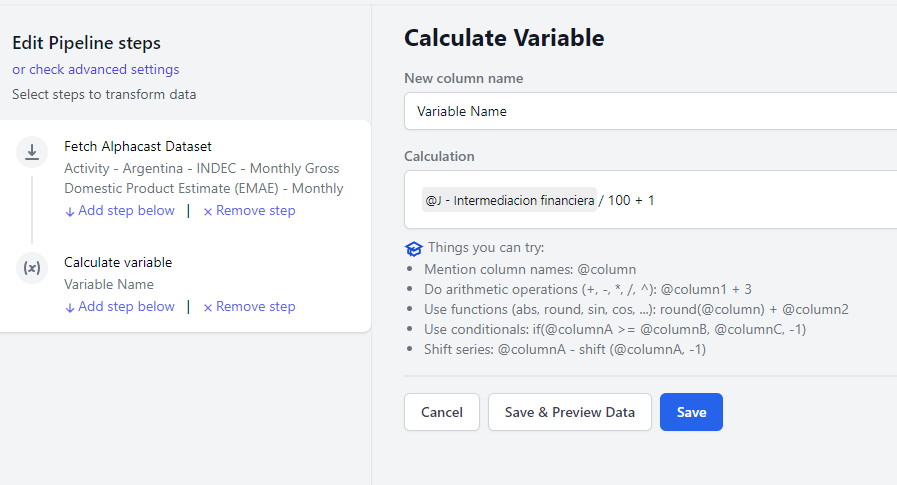
Create a pipeline (Create new → Pipeline in the top right), select a data source, then Add step below → Calculate Variable. The rules:- Name the variable in the textbox. Choosing a name that already exists overwrites that column.
- Type
@to reference a column. Start typing the name and matching columns appear. - Use basic arithmetic —
+,-,*,/,^:@column1 + 3 - Call functions by name followed by parentheses, with commas between parameters:
round(@column) + @column2 - The result always has the same number of rows as the input, even for calculations that would normally reduce dimensionality such as a total per group. See group functions below.
Row functions
Row functions use only the values in a single row — no other periods or entities are involved. This includespower, exp, sqrt, log, abs, trunc, round, sin, cos and more.
Nested calculations
Calculations nest inside other calculations as parameters:Group functions
Group functions calculate over subgroups of the dataset. The data is split by the unique values of the entities given as parameters, and the calculation runs separately for each group. Those entities can be the dataset’s real entities, any other variable, or even the result of a nested calculation.Rolling window functions
Rolling windows are group functions that also calculate within a moving window. You define how many periods the window spans.Date and time functions
These operate on datetime variables — usually the@Date entity — and include year, month, day, week, dayofyear and others.
Video tutorial
This tutorial is in Spanish.
Next steps
Formula reference
Every operator and function, grouped by category.
Apply transform
Prebuilt economic transformations that need no formula.